

Dynamics 365 Business Central
Business Central test automation for the processes your business depends on
Keep sales, purchasing, inventory, and finance moving through every change. elevaite365 helps your team build repeatable tests for Microsoft Dynamics 365 Business Central and the connected applications behind your everyday workflows.
Why automate
A routine update should not become a business interruption
Microsoft updates, extensions, configuration changes, and integrations can affect processes that worked yesterday. Manual regression testing takes people away from their day jobs and makes it difficult to check every important variation consistently.
- Repeat critical checks before an update reaches production
- Include the customizations and extensions your business relies on
- Give process owners a repeatable way to verify changes
Business process coverage
Start with the workflows you cannot afford to interrupt
Sales orders
Validate order entry, pricing, discounts, shipment, and the steps that lead to a customer invoice.
Purchasing
Check purchase orders, receiving, supplier invoices, and the rules that keep procurement on track.
Invoicing
Verify invoice creation, posting, credit memos, and the amounts your customers and suppliers expect.
Inventory
Test item movements, availability, transfers, and the inventory records that support fulfillment.
Finance
Cover journal posting, payment application, reconciliation, and the checks your team performs at period close.
Approvals
Confirm that purchase and sales documents follow the approval rules and permissions your business has configured.
How elevaite365 helps
Build a test library around the way your team works
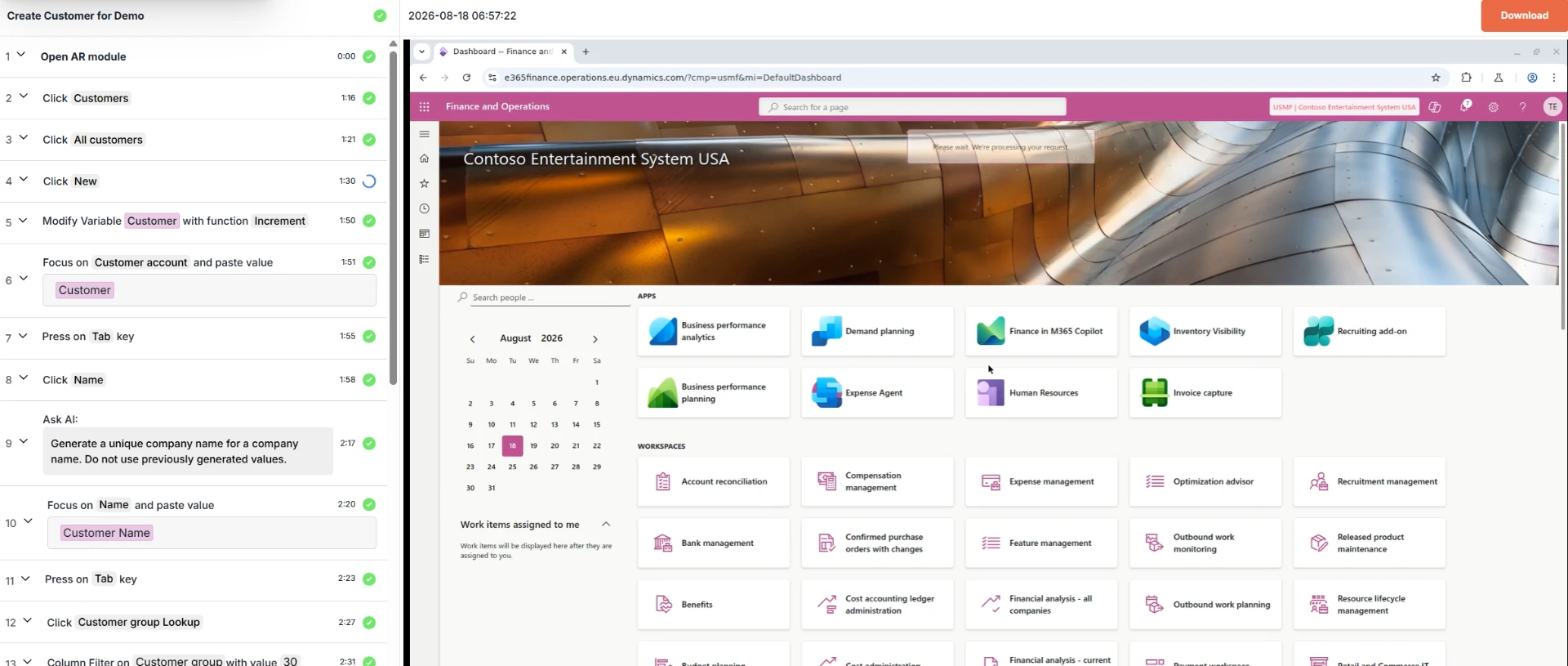
Turn business knowledge into repeatable scenarios. Reuse test components, use variables for different records and values, and add verification steps that check the outcome, not just whether a screen opens. AI-enhanced assistance supports test building while your team stays in control of what is tested.
- Reuse common steps across multiple business scenarios
- Use variables to cover different customers, items, and transaction values
- Run tests on demand or as part of a planned regression cycle
- Review step-level results and evidence to investigate failures
Connected applications
Test the whole process, not just Business Central
A sales order may begin in another application, reach Business Central for fulfillment and invoicing, and depend on a connected service along the way. elevaite365 supports cross-application scenarios so your testing can follow the business process across supported connected applications, rather than stopping at one system's boundary.
- Include upstream and downstream steps in your test plan
- Verify handoffs and business outcomes across connected systems
- Use a demo to confirm coverage for your applications and integrations
Business benefits
More time for your business. Better evidence for your next release.
Reduce repetitive effort
Let repeatable tests handle routine regression checks so your team can focus on exceptions and new requirements.
Expand meaningful coverage
Build on reusable steps to check more business variations without starting each scenario from scratch.
Make informed release decisions
Use test results to identify issues and assess readiness before changes reach the people who depend on Business Central.
See elevaite365 in action for Business Central
Tell us which Business Central processes, extensions, and connected applications matter most. We'll tailor a demonstration to your testing priorities.